Account
Account & billing
Your account settings, security, preferences, and how per-profile billing works.
Account settings
Your identity lives here: name, avatar, email, and the connected accounts you can sign in with. Google and Apple are both supported as sign-in options; link or unlink them under Connected accounts.
Changing your sign-in email is not available in the form yet. Use theContact support link under your email to open the same support panel as the sidebar button.
Note
Saving changes
Settings across Metryx share one save pattern. The moment you change something, a bar slides up from the bottom of the screen telling you there are unsaved changes. Save writes everything you touched; Reset puts every field back the way it was. If a save fails, the reason shows in the bar and nothing closes until it goes through.
Every save, send, and delete also confirms itself with a small notification in the bottom right corner: a green check when it worked, a red cross with the reason when it didn't, and a neutral note for things like deletions.
Editors and builders (embeds, access codes, stickies, reaction role menus, autoroles) close with the X in their top right corner, or by pressing Esc. If you still have unsaved changes, the bar shakes instead of letting you leave, so you can't lose work by accident.
Note
Security
Password changes, two-factor authentication, and active devices. 2FA enrollment is one dialog: confirm your password, scan the QR code with any authenticator app, download your backup codes, done. The devices list shows every active session, with a one-click sign out of all of them.
Warning
Preferences
How the dashboard behaves for you: appearance (dark or light), live mode on or off, your default date range, and which page a profile opens on. These are per-user. Your teammates keep their own.
Appearance is saved to your account, so it applies on every browser and device you sign in on. Dashboards, charts, and heatmaps all adapt to the theme you pick.
Default time range controls the first range on every metrics page. A range you choose on a page is temporary, so refreshing returns to this default. Live updates controls whether current member, voice, and activity numbers keep moving without a refresh.
Note
AI token pools
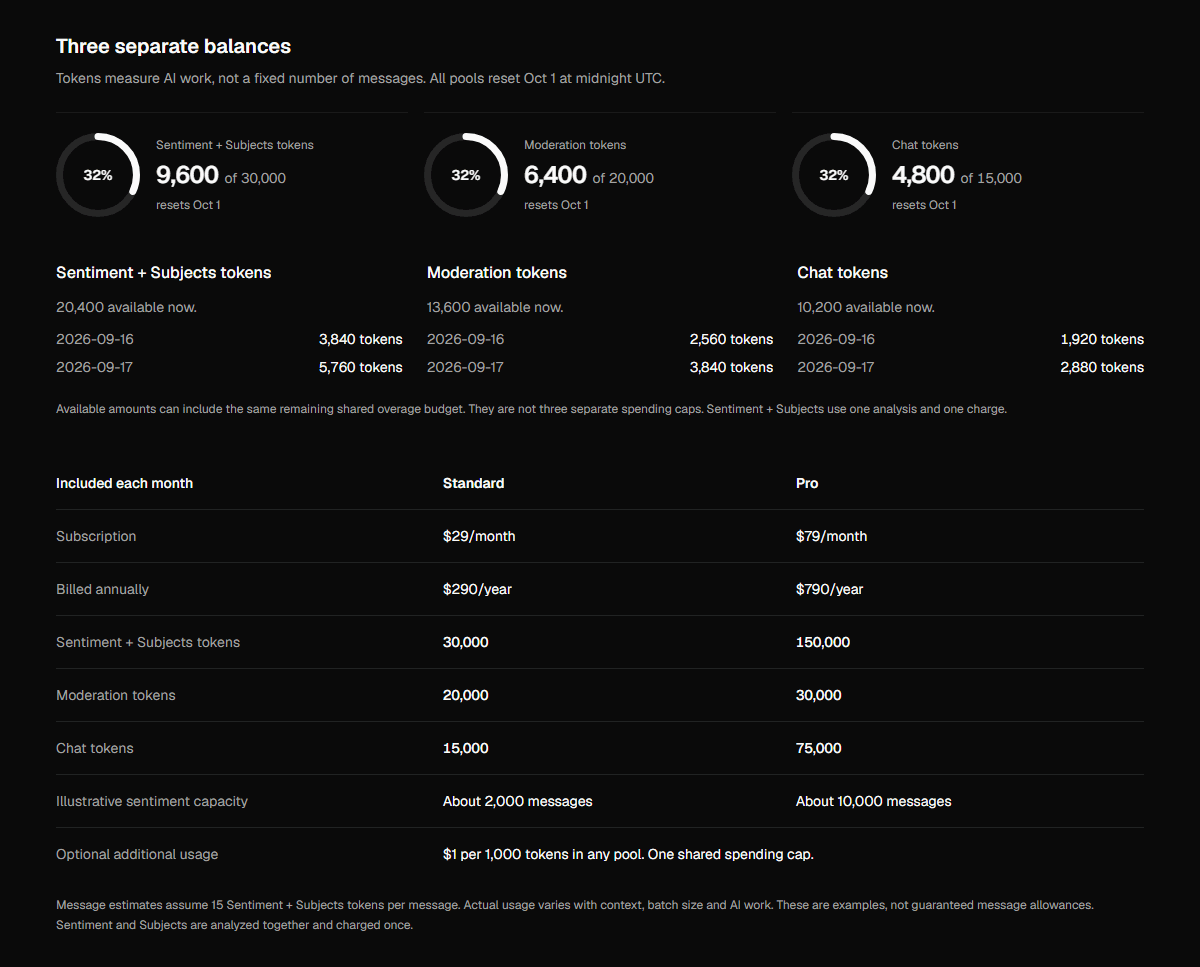
| Included each month | Standard | Pro |
|---|---|---|
| Subscription | $29/month | $79/month |
| Billed annually | $290/year | $790/year |
| Sentiment + Subjects tokens | 30,000 | 150,000 |
| Moderation tokens | 20,000 | 30,000 |
| Chat tokens | 15,000 | 75,000 |
| Illustrative sentiment capacity | About 2,000 messages | About 10,000 messages |
| Optional additional usage | $1 per 1,000 tokens in any pool. One shared spending cap. | |
Message estimates assume 15 Sentiment + Subjects tokens per message. Actual usage varies with context, batch size and AI work. These are examples, not guaranteed message allowances. Sentiment and Subjects are analyzed together and charged once.
Note
Plans & billing
Billing is per profile, per month. Each profile carries its own plan, and profiles stack. Checkout and card management happen right in the dashboard.
| Free · $0 | Live data, 30-day history, daily AI insight, 500 Chat tokens a month, 2 AutoMod rules, 1 seat. A real product for trying Metryx out. |
| Standard · $29/mo | Full history, AI moderation, Sentiment and Subjects, 15,000 Chat tokens, 20,000 Moderation tokens and 30,000 Sentiment + Subjects tokens a month, AI reports, access codes, Invite Tracker, streaming stats, 10 AutoMod rules, 2 seats. |
| Pro · $79/mo | Everything in Standard with 75,000 Chat tokens, 30,000 Moderation tokens and 150,000 Sentiment + Subjects tokens a month, unlimited reports and rules, powerful utilities, scheduled exports, unlimited seats. |
Note
Note
Changing plans opens a review page before anything happens. Pick a plan on the billing page and you land on a summary of what the switch adds or removes, plus the money side: upgrades show the exact prorated amount charged today, tax included, priced live by Stripe. Downgrades show a $0 charge and the date your current plan runs out. Nothing changes until you confirm on that page.
Manage billing on the plan card opens Stripe's own billing page, where everything about an existing subscription lives. Stripe already processes the payments, so your card details never take a detour through us.
| Payment methods | Add a card, remove one, or keep a backup and choose which one gets charged. |
| Invoices | Every charge on the profile, viewable and downloadable as a PDF. |
| Billing information | The name, email and address printed on your invoices, plus a tax ID if you need one on there. |
| Plan changes | Switch between Standard and Pro, monthly or yearly. Stripe shows the prorated amount before you confirm. |
| Cancelling | Cancel subscription, then tell us why. Your plan runs to the end of the period you already paid for. |
Note
Subscribing for the first time still happens on Metryx: pick a plan on the billing page, enter your address and card, and you land back here. After that, everything is under Manage billing.
Have a promo code? Enter it at checkout and hit Apply. The total re-prices on the spot so you see the discount before you pay. Invalid or expired codes are rejected immediately.
Deleting your account
You can delete your account yourself, no support ticket needed. Click Delete account, type DELETE in the confirmation dialog, and confirm. When it finishes you're signed out everywhere and returned to the homepage. The same option exists in the mobile app.
Deleting your account cancels any active subscriptions on profiles you own right away, so you won't be billed again. Your seats on other people's profiles are removed too; those profiles themselves are not affected.
Warning